
Upload errors and how to fix them
Every upload message you can hit, what it means, and the fix.
Updated Aug 15, 20262 min read
| You see | It means | Do this |
|---|---|---|
| Only PDF or image files are accepted. | The file type isn't supported for takeoff pages | Convert to PDF, PNG or JPG. Specs and schedules go under Related documents instead |
| This PDF is password-protected. Remove the password and try again. | The PDF is encrypted | Open it in a PDF app, save an unprotected copy, re-upload |
| We couldn't read this PDF. It may be corrupted or use an unsupported format. | The file didn't parse | Re-export from the source (CAD/Bluebeam/Acrobat) or Print to PDF and try again |
| File is too large. Max 500 MB per PDF, 50 MB per image. | Over the size limit | Split the PDF or compress the image |
| This PDF has more than 500 pages. Split it into smaller sets… | Over the page limit per file | Split into volumes; upload them all to the same project |
| …exceeds the N-page project limit. Email hello@plankore.ai to raise your limit | Your account's per-project cap | Split the set into two projects, or email us to raise it |
| Connection lost. Check your internet and retry. / Network error. | Upload interrupted | Reconnect and drop the file again |
| Couldn't start the upload. Try again in a moment. | Temporary server issue | Wait a minute and retry; if it persists, email us |
| Some files could not be processed (Review screen) | One or more files failed; the rest are fine | Remove the failed file(s) and Continue to Takeoff & Bid, or fix and re-add them later via Add takeoff files |
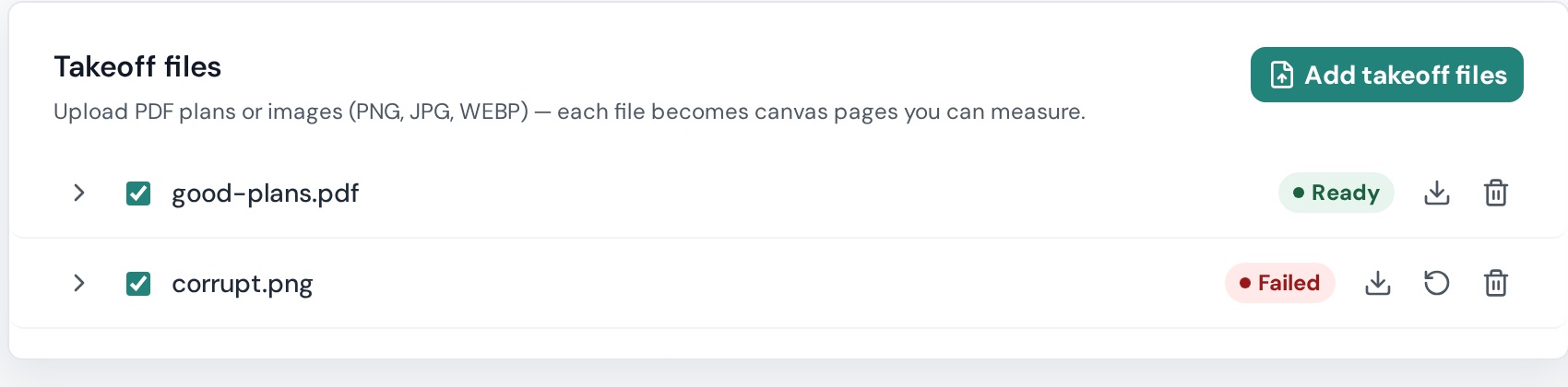
| Failed badge on a file in Project Details | Processing failed after upload | Retry processing; if it fails again, Download original to check the file, then Delete file and re-upload a clean copy |
| Render failed on a single page thumbnail | That page didn't render | Hover it → Tap to retry |
| Processing failed. Open Project Details to see why each file failed… | Nothing rendered yet | Go to Project Details → Takeoff files and follow the per-file status |
Still stuck? Email hello@plankore.ai with the file name and the message — see Contact support.