
Contact Plankore support
How to reach us from inside the app or by email, what to include so we can help quickly, and the requests we handle by email.
Email hello@plankore.ai. That one address covers questions, bugs, billing and account requests. There is no chat widget in the app.
From inside the app
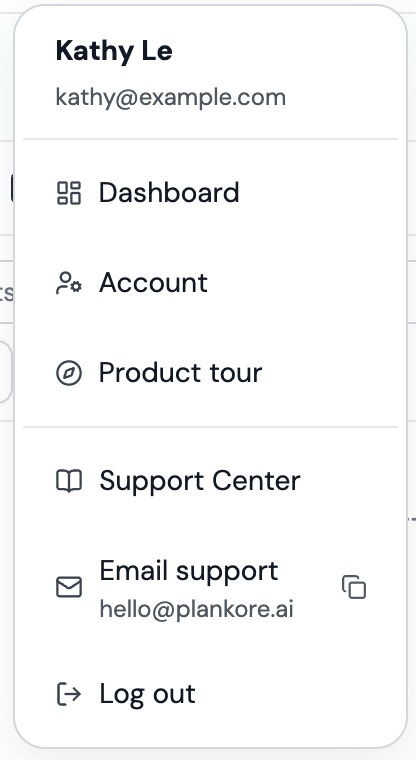
- Click your avatar, top right.
- Click Email support. It opens a new message to hello@plankore.ai in your mail app. The address is printed under the label; the copy icon next to it puts the address on your clipboard and shows Email address copied.
The same menu has Support Center, which opens these articles in a new tab, and Product tour, which replays the in-app walkthrough.
Include this and we can help faster
- The project name, and the page name if it is about one sheet.
- What you clicked and what you expected to happen.
- The exact error message, word for word.
- A screenshot or short screen recording.
- Your browser and operating system, for example Chrome on Windows 11.
Send it from the email address on your Plankore account so we can find you.
Requests we handle by email
- Raise the page limit on a project. Projects are capped at 300 pages. If the upload wizard says This selection has N pages, which exceeds the 300-page project limit. Email hello@plankore.ai to raise your limit, send the project name and how many pages you need.
- AI Bid early access. AI Bid is not part of any plan yet. The AI Bid tab has an Email hello@plankore.ai button that starts the message for you. See AI Bid.
- Change your profile details. Name, email, company and phone are read-only in the app. Tell us what to change.
- Delete your account. Email from the account's address; see Manage your account and subscription.
- Billing questions. Include the email on the account and the date of the charge. Never send card numbers.
- Checkout or plan problems. If the plan picker says No plans are available right now. Please contact support. or Could not start your subscription, tell us which button you clicked.
Before you write
A few things are quicker to fix yourself:
- An upload stuck or failed: see Supported files and upload limits.
- A greyed-out tool that says Available on Plankore Pro: see Plankore plans: Free Forever vs Pro.
- Someone cannot edit a project you shared: see Roles: owner, editor, viewer.
Plankore Pro includes priority support, and Enterprise customers have a direct line to the founders.
Still need help?
Email hello@plankore.ai and we'll reply within 48 hours. So we can find your work quickly, include the email you sign in with and the name of the project.