AI coins: pay for P-Chat
How P-Chat replies are paid with AI coins, where to see your balance and usage, how to top up, the Pro welcome bonus, and what happens when coins run low or run out.
AI coins pay for P-Chat's replies. Your plan gives you P-Chat; the coins pay for the work it does. Every account starts with none, the free trial included: top up to start using P-Chat. Unused coins never expire.
What a reply costs
Each reply costs coins according to how much AI work it took: a short question uses few, while a long job that reads many sheets and draws a lot of takeoff, such as a full framing takeoff of a house, uses many times more. Check P-Chat usage, last 30 days on your Account page to see what your replies have used.
Coins come off as P-Chat works, so a long reply takes them bit by bit, and a reply can end slightly below zero; your next top-up covers that first. A reply that fails before P-Chat answers at all costs nothing.
See your balance and usage
Open Account from the menu under your avatar. The AI coins card shows:
- Balance, in AI coins.
- Pro welcome bonus: whether you have had it, or how many coins your first Pro payment brings.
- Top-ups & credit history: each top-up, bonus and adjustment with its date and coins. Show more goes further back.
- P-Chat usage, last 30 days: for each day, the number of Replies and the Coins they used.
Top up
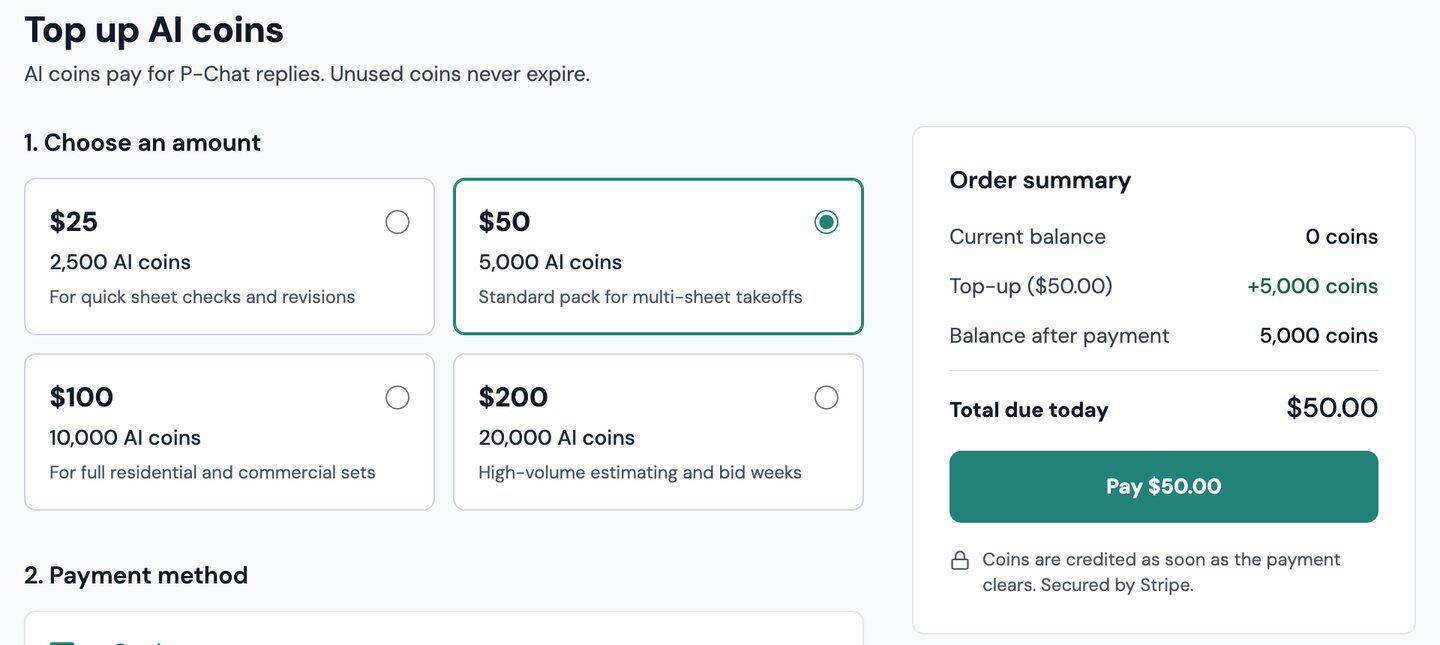
- On the AI coins card, click Top up coins. The Top up AI coins page opens. (From the chat, the button takes you to the same page and keeps your message as a draft.)
- Under 1. Choose an amount, pick $25, $50, $100 or $200. Each shows how many coins it buys. The $100 pack adds 3% more coins and the $200 pack 5% more, marked on the pack.
- Under 2. Payment method, enter a card or pick a saved one.
- Check the Order summary (current balance, the top-up, your balance after payment and the total due today) and click Pay $50.00 (the amount you picked).
Coins are credited as soon as the payment clears. Payments go through Stripe.
You need a plan to buy coins, and the 7-day free trial counts. Without one, the page reads AI coins come with a plan. Choose a plan to top up. See Plankore plans.
The Pro welcome bonus
Your first full payment for Plankore Pro adds a one-time bonus of coins: coins worth $25 on the monthly plan, or $50 on the annual plan. For the holidays it is doubled: $50 on monthly, $100 on annual. The Pro welcome bonus line on the AI coins card shows how many coins that is before you pay, and the date they were added after.
- It comes once per person, with a first Pro payment: on the free trial it arrives when you start paying for Pro. Collaborator doesn't get it.
- Accounts already paying for Pro when AI coins launched don't get it, and neither does an email address that has had it before. The card then reads Not available on this account.
- A Pro payment smaller than the bonus (after a discount, or a part-month charge when you move from Collaborator) doesn't bring it. It comes with your first Pro payment of at least that amount.
- If that payment is refunded, the bonus is taken back: Taken back on [date] (payment refunded).
Running low or out
- Running low. A strip above the message box reads Running low on AI coins, with a Top up link. While you are low, P-Chat works on one chat at a time.
- Out of coins. The message box makes way for You're out of AI coins: Your balance is [N] coins. Top up to go on with this chat; your draft stays here. Click Top up coins. Back in the chat, it reads AI coins added. Your draft is ready to send. A new account sees this box until its first top-up.
- Mid-reply. If your coins run out while P-Chat works, it stops. What it already changed stays. Top up and ask it to carry on.
If your plan ends
P-Chat needs an active plan. If your plan has ended, your next message comes back with Choose a plan to go on: P-Chat needs an active plan. Your message wasn't sent; it's back in the box, and your AI coins are kept. Click Choose a plan. After that, the P-Chat button doesn't show until you have a plan again. Your coins are still there when you come back.
A top-up that is refunded or disputed is taken back too, and shows as Top-up reversed in your history; that can leave your balance below zero.
For a refund or a charge you don't recognise, contact support with the date and amount of the top-up.
Still need help?
Email hello@plankore.ai and we'll reply within 48 hours. So we can find your work quickly, include the email you sign in with and the name of the project.