
Edit takeoffs: copy, undo and delete
Copy shapes to the same page or another page, undo your last 10 actions, and know which deletes can't be undone.
Copy and paste
- Select the shapes and press ⌘C / Ctrl+C.
- Press ⌘V / Ctrl+V. Plankore asks how to paste:
- New Object: a separate object named after the original, with (Copy) at the end.
- New Section of the original object: the copy adds to the original object's total.
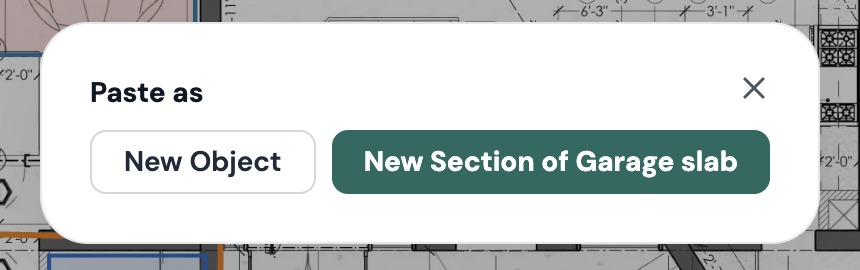
On the same page, the copy lands where your cursor is. You can also paste on another page, and the quantities are recalculated with that page's scale.
Right-clicking a shape and choosing Copy copies it and opens the Paste as choice straight away.
Undo and redo
| Mac | Windows | |
|---|---|---|
| Undo | ⌘Z | Ctrl+Z |
| Redo | ⌘Y or ⌘⇧Z | Ctrl+Y or Ctrl+Shift+Z |
You can also use the arrows at the top left of the toolbar.
Plankore remembers your last 10 actions. That covers drawing, moving, reshaping, adding and deleting points, paste, New Section, Subtract, Merge, Split, Move to new object and deleting shapes on the plan. While you're drawing, Undo removes the last point.
These can't be undone:
- Changes in Properties: name, color, opacity, thickness and CSI division
- Scale changes
- Page and folder changes
- Deleting from the Takeoff panel or the Page List
Reloading the page clears the undo history. If you undo something on a different page, Plankore tells you what it restored, with a Go to page button.
Delete
- On the plan: select the shapes and press Delete or Backspace, or right-click and choose Delete. No confirmation, and you can undo it.
- In the Takeoff panel: right-click an object and choose Delete. Plankore asks "Delete 1 object permanently?" Click Confirm Delete to go ahead.
- A folder in the Takeoff panel: deleting a folder also deletes every object inside it.
Still need help?
Email hello@plankore.ai and we'll reply within 48 hours. So we can find your work quickly, include the email you sign in with and the name of the project.