
Check and undo what P-Chat changed
Find the takeoff P-Chat made, check it before you price it, undo or redo its changes in AI changes, and how P-Chat learns from the fixes you make.
Everything P-Chat draws is an ordinary takeoff object in your project. You can move, rename, recolour or delete it like your own, and you can undo P-Chat's changes from the chat.
Find what it made
- In the chat. After a reply that drew takeoff, a card reads, for example, Made 6 takeoff objects, with a row for each. Select on sheet opens the page and selects that object; Show all 6 lists the rest.
- In the Takeoff tab. New objects appear as P-Chat draws them, in the folders it names in its reply.
- In its reply. P-Chat says what it drew, where, and the totals, for example 11 doors, matching the door schedule on page 6.
Check it before you price it
P-Chat reads drawings well, but like anyone it can misread one. Before you put its takeoff on an estimate:
- Click through the objects with Select on sheet and look at where each point, line or area sits.
- Spot-check a few lengths with Measure. See Measure a distance.
- Ask it to show its work: Which doors did you count, and where? or Which sheet did you take the wall heights from?
Undo or redo a change
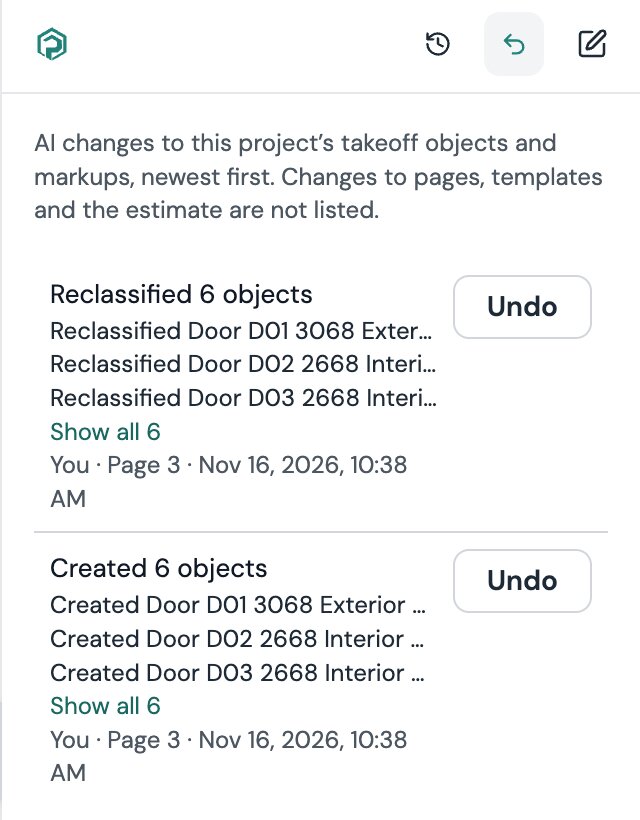
- Click AI changes, the curved-arrow icon beside the clock in the P-Chat header.
- The panel lists the AI's changes to the open project's takeoff objects and markups, newest first: Created 6 objects, Added 2 sections to …, Reclassified 6 objects (it set their trade classification), with who asked for it, the page and the time. Everyone's AI changes in the project are there, so you see a teammate's too.
- Click Undo on a change. It turns to Undone by you, with Redo to put it back.
Undo asks first when it would do more than you might expect:
- Someone changed these objects after the assistant drew them; undo deletes those edits too.
- These objects are priced in the estimate; undo removes their estimate rows.
Click Undo change to go ahead.
AI changes shows the project you have open. With no project open it reads No project open. Undo needs edit access to the project.
P-Chat learns from your fixes
When you change something P-Chat drew (move a point, rename an object, delete one), your next message in that chat tells P-Chat what you changed, as long as you send it with the project still open and haven't reloaded the page since. It takes that into account, and can keep a note of it for your later chats, so it gets closer to the way you work. You don't need to explain the fix, though a word on why helps: I moved the count to the door swing, that's how we count doors.
Still need help?
Email hello@plankore.ai and we'll reply within 48 hours. So we can find your work quickly, include the email you sign in with and the name of the project.